
The shortlist: check the meeting language first
These are documented feature differences, checked on 18 November 2026. Language support describes availability, not a promise of equal accuracy for every voice or recording.
| Product | Nordic meeting languages currently listed | A useful reason to consider it |
|---|---|---|
| Aivo | Danish, Norwegian Bokmål, Swedish, Finnish, Icelandic | Nordic recording and transcript review inside the Mac app you use for dictation. |
| Granola | Danish, Norwegian, Swedish, Finnish | An AI notepad with broad device coverage and meeting-note workflows. |
| Wispr Flow | Danish, Swedish | Notetaking and dictation, with meeting summaries and wider meeting workflows. |
| Otter | None of the five in its current transcription list | A meeting platform to consider for English and its other supported languages. |
Why start with Aivo for Nordic Mac meetings?
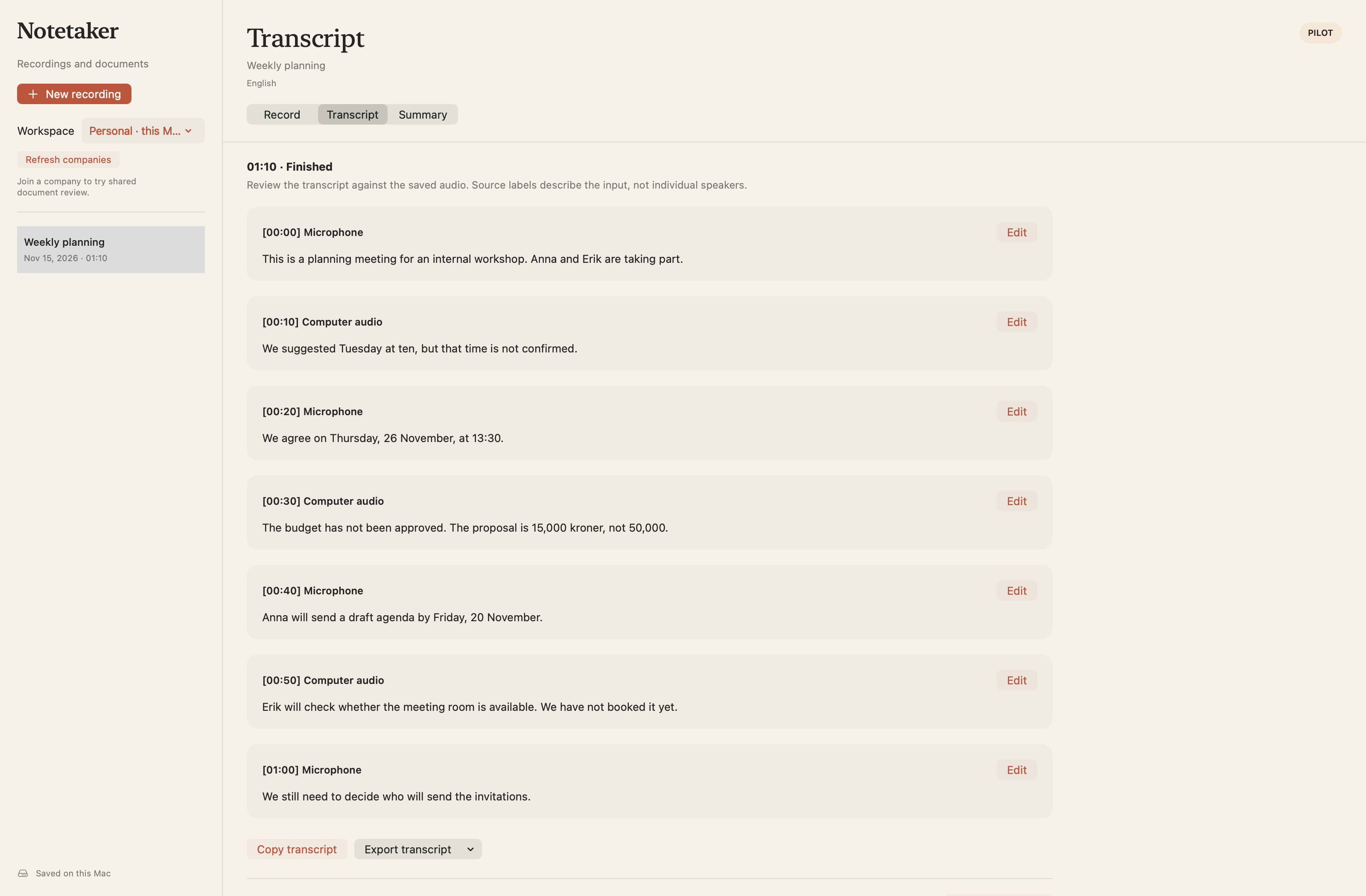
Aivo gives you a direct sequence: record the conversation, transcribe the saved audio, then check the words before you use them. Choose Danish, Norwegian Bokmål, Swedish, Finnish, Icelandic or English. Notetaker requires macOS 15 or later; ordinary Aivo dictation still supports macOS 13 or later.
For a computer call, Aivo captures your microphone and the computer audio that macOS allows it to record. For a face-to-face discussion, position the microphone where everyone can be heard. Recording starts manually, and Aivo does not appear as another participant. Tell people before recording and follow the permission requirements for your meeting.
Personal recordings and transcripts remain on your Mac until deleted. Recording alone does not upload personal audio. You choose when to send the saved recording to OpenAI for transcription. Review and edit the transcript, then copy it or export TXT or Markdown. Cloud processing uses your account’s applicable allowances.
Need speaker labels or a structured summary?
Aivo’s company pilot adds recording-specific speaker labels, plus Summary drafts with source references, review, approval and Word or PDF export. These features require an explicitly enabled company workspace. A paid subscription or Teams trial alone does not enable them.
Standard personal transcripts show microphone and computer-audio sources rather than identifying individual participants. The company pilot’s Speaker 1 and Speaker 2 labels are also not automatic identity recognition. Ask about pilot access if this is essential to your workflow.
Granola: consider the wider notepad workflow
Granola describes a bot-free AI notepad and offers macOS, Windows, iOS and Android apps. Its desktop language list includes Danish, Norwegian, Swedish and Finnish; Icelandic is not listed. Device-specific language support can differ.
It is worth evaluating if your priority is an established meeting-notepad workflow across several devices. Granola now also advertises voice typing, so the choice is not simply “meetings versus dictation.” For a Nordic Mac shortlist, compare the actual supported language and the output you need.
Wispr Flow: verify Notetaker languages separately
Wispr offers Notetaker on Mac, Windows and iPhone, alongside its dictation product. Its current Notetaker documentation lists Danish and Swedish among 21 supported languages. Norwegian, Finnish and Icelandic are not on that list.
That distinction matters: a language supported for dictation should not be assumed to be supported for meetings. Consider Wispr if its documented meeting languages and summary workflow match your needs; check its current Notetaker documentation before testing a Nordic recording.
Otter: a different fit for English-led meetings
Otter offers transcription, summaries and searchable meeting content. Its November 2026 language expansion broadens the product, but its published transcription list still does not include Danish, Norwegian, Swedish, Finnish or Icelandic.
It belongs on a shortlist for meetings in its supported languages. An ability to translate text into another language is a different capability from transcribing speech originally spoken in that language. Check the source-audio language, not just the languages available in AI chat.
Use one realistic test before changing tools
Try an approved, non-sensitive sample in the language and room you actually use. Include an ordinary name, a date, a number and an explicit correction. Check the whole task, including the time you spend fixing the result.
- Can you hear both your microphone and the remote caller?
- Did the transcript preserve a negation and the corrected date or amount?
- Can you replay a doubtful passage and correct it?
- Does your account actually include the export, speaker or summary feature you need?
- Are the processing and retention terms acceptable for this conversation?
Keep your existing notes before you switch
Aivo currently does not import a meeting library from another notetaking app. Save the notes and exports you need from your previous service. Start with one new Aivo recording rather than assuming historic meetings will transfer.
Check current plan allowances and recording limits before a long session. For sensitive workplace material, use an approved workflow: Aivo’s current cloud processing is global, and strict EU/EEA-only processing or zero provider retention is not guaranteed.
Questions about this workflow
Is Aivo a Granola alternative for Icelandic?
Yes, Aivo Notetaker supports Icelandic on Mac with macOS 15 or later. Granola’s current published desktop language list does not include Icelandic. Test your voices and terminology before relying on any transcript.
Does every Aivo user get meeting summaries and speaker labels?
No. Personal users can record, transcribe, review and export TXT or Markdown. Speaker labels and the reviewed Summary workflow currently require an enabled company pilot.
Can I record without a meeting bot?
Yes. Aivo captures permitted microphone and computer audio from your Mac, without joining the call as a participant. You still need to inform participants and obtain the required permission.
Check current plans and allowances · Read Aivo’s privacy policy
Sources and review
Reviewed 18 November 2026
Original Aivo editorial. Official product documentation checked 18 November 2026. Feature comparison, not a matched accuracy benchmark. Price figures intentionally omitted. Company speaker labels and Summary remain enabled pilot features; no general subscription entitlement is implied.
- Aivo Mac 1.0.25 public release and Notetaker FAQ
- Verified Aivo Notetaker scope
- Aivo privacy policy
- Company Notetaker pilot privacy notice
- Granola: Multi-language support
- Granola official product page
- Wispr: Use Notetaker with multiple languages
- Wispr Notetaker official product page
- Otter supported transcription languages, updated 10 November 2026
- Otter official product page